I was rubber-stamping my AI agent. So I made it ask for my fingerprint.
A first-person account from the person who built Signeto: why the yes/no prompt stopped working, the three requirements that fell out of letting an agent trade, and how the same shape covers merges to main and production deploys. For developers, security engineers, and anyone who has to show an auditor that a human approved an AI action.
Approving everything is approving nothing
Somewhere in my third week of running Claude Code on real projects, I caught myself doing something I would have called reckless a year earlier. A permission prompt came up. I pressed yes. Another one. Yes. I had stopped reading them.
It wasn't laziness. The prompts were mostly right. The agent wanted to run tests, read a file, list a directory. Saying yes to a hundred of those a day trains you to say yes. And once you're trained, the one prompt that matters looks exactly like the ninety-nine that don't.
That's when I realised the yes/no dialog had become theatre. I didn't want fewer prompts. I wanted the right ones to actually mean something.
The other way out is the one most people take: turn on auto mode and stop being asked at all. It's a reasonable trade for reading files and running tests. It's a bad one for the few actions you can't take back. With auto mode on, you find out about the merge or the deploy afterwards, from the agent's summary.
Where it started: an agent that could trade
The first time this stopped being abstract, money was involved.
I had an agent wired up to my brokerage account through Alpaca's API. It could look at positions, draft an order, and place it. The analysis was great. The placing made my stomach turn, because "place order" was just another tool call, and the agent had the API key.
What I wanted was simple to say and hard to build: before any trade goes through, show me that trade, on something the agent can't type into, and let me say yes or no. Not "allow trading." This order, this symbol, this quantity, this side.
Three requirements fell out of that one case, and they never changed:
- Approve the specific action, not a category. A standing "yes, you may trade" is exactly the rubber stamp I was trying to get away from.
- Approve it somewhere the agent can't reach. If the approval happens in the terminal the agent is driving, the agent can drive the approval. My phone is a different machine with a different key.
- Keep a record I didn't write. Afterwards I want proof that I said yes to those bytes, not a log line the agent could have produced itself.
I tried the obvious fixes first. "Just be careful" lasted a day. A confirm dialog in the tool lasted longer, until I noticed it was advisory: the agent still held the API key, so the dialog was a suggestion the model could skip and I'd never know. The problem wasn't the prompt. The problem was who held the credential.
Then it got bigger: merges and production
Once I had the shape of the problem, I saw it everywhere.
Claude Code runs as me. It has my gh login and my push access. If it decides to merge a pull request into main, gh pr merge works and nothing asks. Same for dispatching a deploy workflow, cutting a release, running a migration against a database it has credentials for. Different upstreams, same three requirements.
So the thing I needed wasn't a trading guard. It was a short list of irreversible or costly actions, a human signature on each one, and enforcement that lives outside the model. Everything else the agent does stays fast and unprompted. That's the point: when the prompts are rare, you read them.
I was also solving this for three people who happen to share a repo. As a developer I wanted the guardrail without friction. The security engineer in me wanted enforcement I could test, not a policy the model promises to follow. And anyone who has sat across from an auditor wants "who approved this, when, and what exactly did they approve?" to be a query, not an archaeology dig through Slack.
That's what I built.
What Signeto does
Signeto is an approval gateway for AI agents. It sits between the agent and the systems that matter, as an MCP server. Five ideas carry the whole thing.
The agent never holds the credential. The gateway does. The agent gets wrapped tools like merge_pull_request, but the GitHub App key, the broker API key, whatever it is, lives in the gateway's encrypted store. There's nothing to talk the model out of, because the model has nothing to act with. On a Mac or a Linux machine, the gateway runs under its own system account (sudo signeto system install), so even an agent with a shell on my account can't read that store, edit the policy, or pair a device of its own.
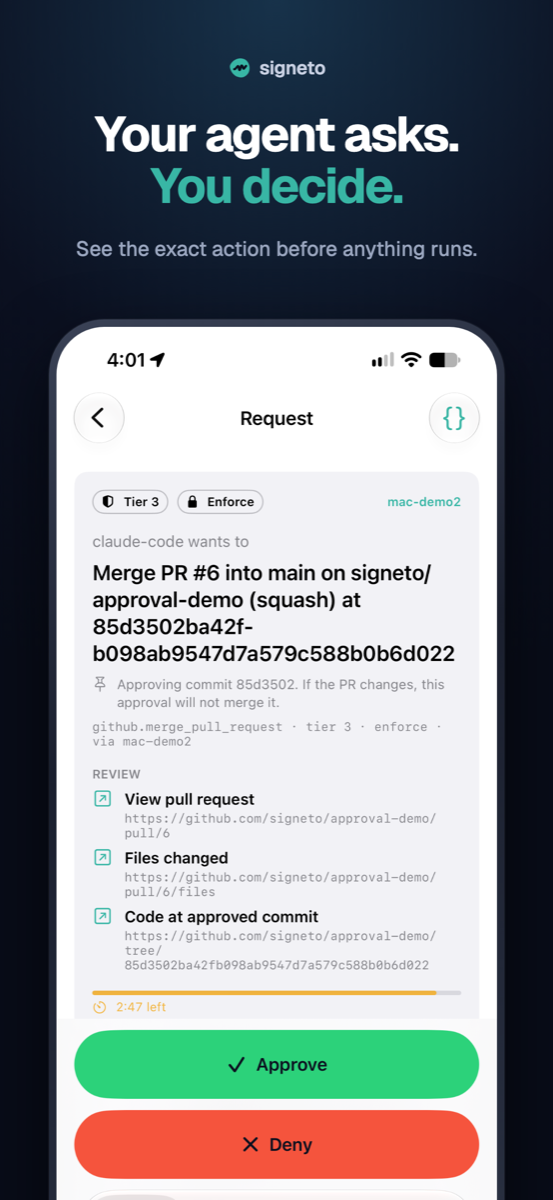
You sign the exact action. When a gated tool is called, the gateway builds a canonical description of the action (RFC 8785 JSON, resolved arguments, a nonce, an expiry). That's what reaches my phone. The card shows it in plain words, and the raw bytes are one tap away. Face ID unlocks a key in the Secure Enclave and signs those bytes. What you see is what you sign. On a Mac it's Touch ID; in a browser it's a passkey.
The credential is one-shot and short-lived. After the gateway verifies the signature against the key it pinned when I paired the phone, it mints a credential for this one action. For GitHub, that's an installation token scoped to one repository that expires within the hour and is used once. The agent never sees it. There is no long-lived token to leak.
Enforcement is on the far side, not in the agent's good behaviour. Setup adds a ruleset to the repository: only the Signeto App can update main. Not me with my gh login, not my SSH key, and not the agent. If Claude Code tries gh pr merge directly, GitHub refuses. The gate is enforced by GitHub, not by the model being polite.
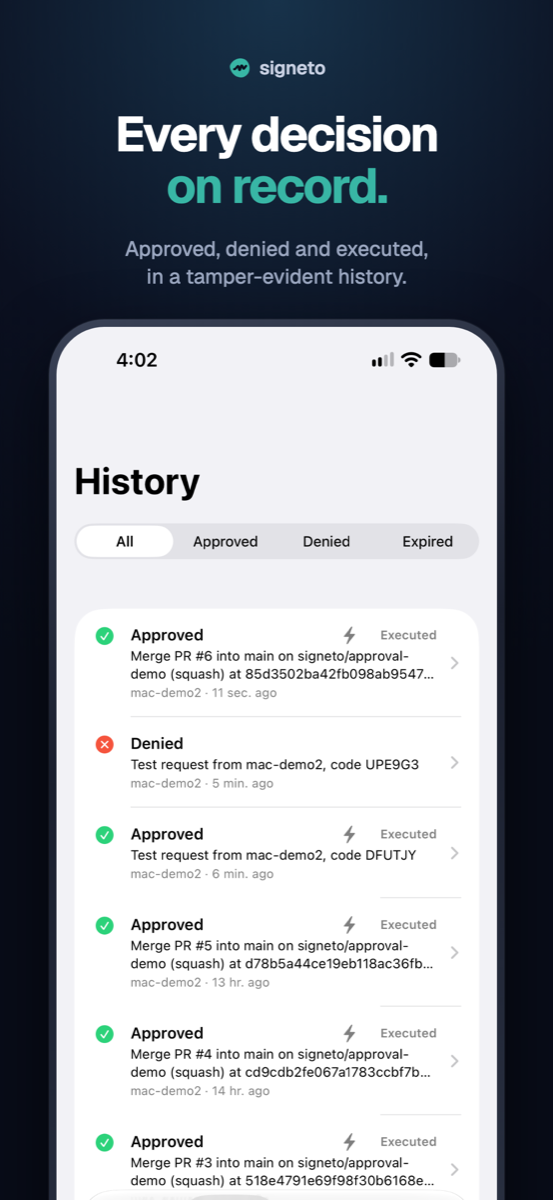
Every decision is a signed receipt in a hash-chained ledger. Approvals and denials both. Each entry is chained to the one before it and records the hash of the policy that was in force, so nothing can be quietly edited after the fact. The receipt format is open and the verification code is open source, so you can check a receipt with no Signeto service in the loop.
Two more things hold it together. The policy file puts every tool into one of three tiers: Tier 1 just runs and is logged, Tier 2 needs any of my enrolled devices, Tier 3 needs a named approver or a quorum. That is the real answer to the rubber stamp: most calls are Tier 1, and the ones that reach my phone deserve to. And the whole thing fails closed. A timeout, an unreachable relay, a malformed receipt, any error at all means the action does not run.
What it looks like
The GitHub flow, end to end. The video above shows it with sound, on the deploy-to-prod example; the install guides have every step in detail, and Install on macOS has a walkthrough video from a fresh account to the first approved merge.
Install and set up. One package, one command.
npm install -g signeto
cd ~/code/your-repo
signeto setup
Setup walks seven steps: create the gateway on this machine, sign in with a passkey, pair the phone, create a GitHub App and protect main, connect Claude Code, send a test approval, run the doctor. Each step checks whether it's already done, so you can stop and resume.
Pair the phone. Scan a QR code in the terminal. Afterwards both sides print key fingerprints and you check they match. The relay that carries messages between them is only a transport. It can't forge a request or an approval, because every request is signed by the gateway and every receipt is signed by the phone.
Ask for the merge. I tell Claude Code to merge PR #6, with auto mode on, so it doesn't ask me about anything else. It calls the gated tool and waits. My phone buzzes. The card shows the repository, the pull request, the merge method, the exact commit. Face ID. A few seconds later Claude Code reports the merge, and the commit on main carries a green Signeto check.
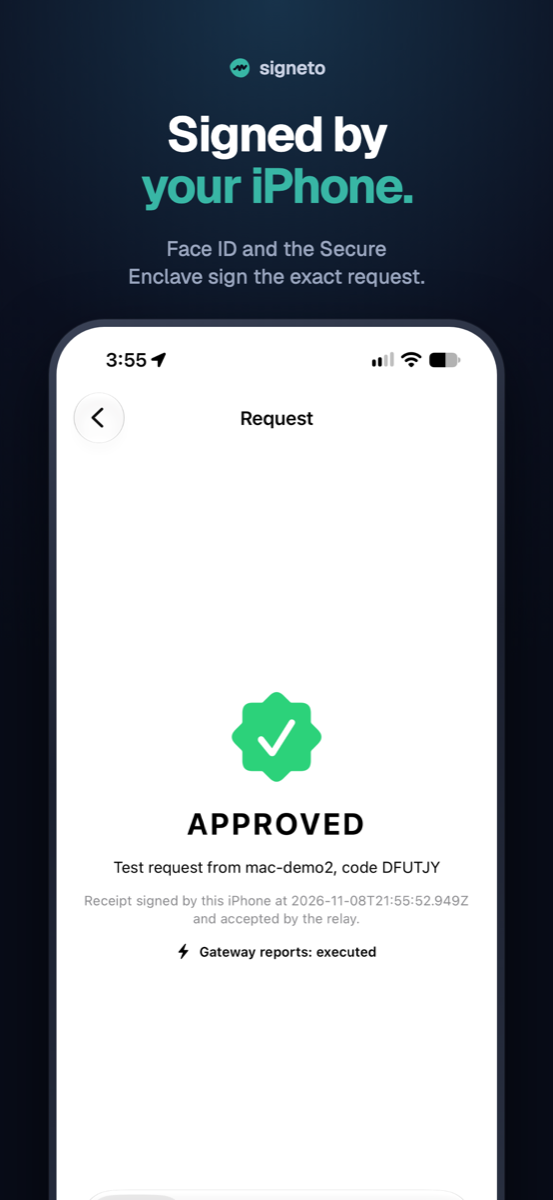
Deny it. Deny is as easy as approve. I turn down the next PR with a reason, and the reason goes straight back to the agent, which stops. The denial is signed and lands in the ledger too.
Try to go around. "Use gh to merge it instead." It tries. GitHub refuses: the branch only accepts the Signeto App. This is the moment that made me trust the thing. It isn't a prompt the model could ignore. It's a wall.
Check the record. signeto ledger lists every request, decision and result, chained. signeto github audit walks the commits on main and ties each one to the approval that allowed it. signeto ledger export writes a report you can hand to someone. In the web account page each card says "verified in your browser," because it was.
What this means depending on who you are
If you're a developer, the prompts you get are rare and real. Nothing changes about how you use Claude Code except one MCP server line in your project, and merges to main now arrive on your phone instead of just happening. Deny is one tap, and the agent hears why.
If you're the security engineer, the properties are the ones you'd ask for. Enforcement outside the model. Hardware-backed keys that never leave the device. Fail-closed on every error path. Gateway-signed requests, so a compromised relay can't put a fake card on a phone. An open protocol you can audit, and receipts you can verify independently. If you run the gateway yourself, Signeto cannot act for you even if Signeto is breached, because Signeto never holds your credential.
If you answer to the auditor, every sensitive action has a record of who approved it, when, over exactly which bytes, signed with a key tied to a person's device, in a chain that shows if anything was altered. That answers "did a human approve this AI action?" with evidence instead of a policy document.
Where it stands today
- Early, and live. The iPhone and Android apps are on the App Store and Google Play, and the free tier is open. The CLI is at version 0.2 and changes fast. GitHub is the first adapter, because merges and deploys are where most people feel the problem first.
- Your credentials stay on your machine. The gateway runs on your own computer and holds the GitHub App's key there. Nothing holds it for you. The security model says exactly what is and isn't guaranteed.
- Windows gets the weaker guarantee, for now. There's no system install on Windows yet, so the gateway runs as your account, and an agent that can run any command as you could read its files and go around it. Your own GitHub login and the agent's
ghstill can't merge into main. The Windows guide says this up front.
Try it
The free plan is one self-hosted gateway on your own machine, two approver devices and unlimited approvals. The iPhone and Android apps are free.
npm install -g signeto
cd ~/code/your-repo
signeto setup
- Install: install to first phone-approved merge, step by step for macOS (with a walkthrough video), Windows and Linux
- Passkeys and approvals: how you sign in without a password, and why your account can't approve anything
signeto teardowntakes it all back out: Removing Signeto- Protocol, adapter SDK and the reference GitHub adapter (Apache-2.0)
- Verify a receipt yourself
- Security model
- Demo video on YouTube, or download the MP4
- Get started: the phone app and the CLI
I started this because I noticed I'd stopped reading the prompts. Now the ones that reach me are worth reading, and the agent can't ship to main without my fingerprint. It can't go around it either.